If you run a YouTube channel, or sell a product YouTubers review, the comments tell you what viewers want next and where they get stuck. Claude can't read them on its own: on Oct 25, 2026, Claude Code's web fetch saw 0 comments on a review video, because they load after the page opens. This guide connects Claude to the YouTube Comments Scraper, which we (Zebu Data) build, so the comments and replies arrive as rows and you can check Claude's answers against them. You don't need the official YouTube Data API, which takes a Google Cloud project and an API key, returns up to 100 comment threads per request, and has no field for pinned or creator-hearted comments.
Quick answer
In Claude, add a custom connector with this URL and sign in to Apify. A free Apify account is enough to try it.
https://mcp.apify.com/?tools=delicious_zebu/youtube-comments-replies-scraperIn a chat, turn the connector on and ask: "Get the top 50 comments with up to 5 replies each for [your video link], then group what viewers ask for."
Claude runs the scraper and answers from the rows: comment text, likes, reply counts, and whether the creator pinned, hearted or answered a comment.
What you get
Every top-level comment is one row. Every reply is its own row and repeats its parent comment's fields, so one table holds both.
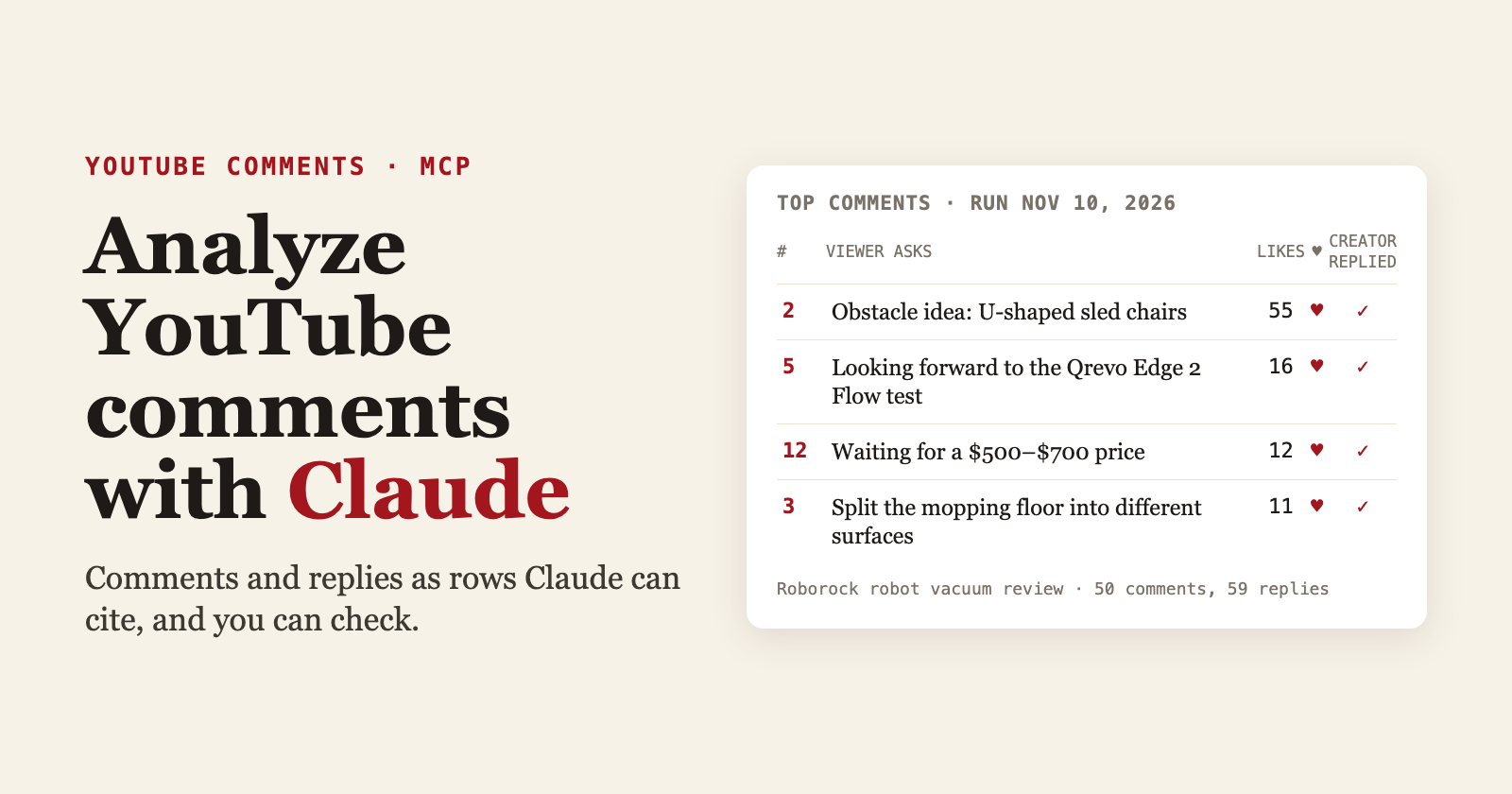
We tested on Vacuum Wars' review "Roborock May Have Just Made Its Best Robot Vacuum Yet" on Nov 10, 2026, with the input from step 2: the top 50 comments and up to 5 replies under each. They came back as 109 rows, 50 comments and 59 replies, in a run of about 18 seconds. Here is one reply row, trimmed to the fields this guide uses:
{
  "type": "reply",
  "comment_rank": 2,
  "comment_content": "I have a new obstacle suggestion within the obstacle avoidance test, u shaped sled chair/s with or without dining table. My robot constantly wrecks itself over those. …",
  "comment_like_count": 55,
  "comment_reply_count": 10,
  "comment_is_hearted": true,
  "comment_date_approx": "2026-10-20",
  "reply_content": "That’s a useful test suggestion! Those low chair bases sound like a real challenge...and the dining set shouldn’t take as long as the whole room!",
  "reply_author_is_creator": true
}
typeiscommentorreply. Filter on it to count comments without double counting.comment_rankis the comment's position on the page, in the order you picked (Top or Newest).comment_is_hearted,comment_is_pinnedandreply_author_is_creatorshow what the creator did. The official API's comment resource has no fields for these.comment_date_approxturns YouTube's "3 days ago" into a date. It's approximate.- Every row also has the commenter's handle, links and IDs for the comment and reply, like counts, edited flags, and the video's like and comment counts.
Step 1: Add the connector
In the Claude app, on the web or desktop:
- Open Customize → Connectors, click + Add, then Add custom connector. On Team and Enterprise plans, an Owner adds it under Organization settings → Connectors.
- Name it
Apify, paste the URL from the quick answer, click Add, then Connect. - Apify's sign-in page opens. Sign in or create an account, then allow access.
Apify now shows in your list of connectors. The Free Claude plan allows one custom connector (Anthropic).
The tools= part of the URL loads only this scraper. Apify adds four helper tools so Claude can check a run and page through its rows: get-actor-run, get-dataset-items, get-key-value-store-record and abort-actor-run.
Using Claude Code? Add the same server from your terminal, then run /mcp, pick youtube-comments and choose Authenticate:
claude mcp add --transport http youtube-comments "https://mcp.apify.com/?tools=delicious_zebu/youtube-comments-replies-scraper"
Step 2: Ask for the comments
Start a chat, click + → Connectors and switch Apify on. Then ask in plain English. Our prompt:
Get the top 50 comments and up to 5 replies each for https://www.youtube.com/watch?v=cyS5NoBmzWs. Group what viewers ask for, cite the comment_rank for every point, and mark which requests the creator already answered.
Claude asks before it runs the tool. Read the request, then allow it. Anthropic's advice is to pick "Allow always" only for tools you trust to run unsupervised. For this prompt, the scraper's input looks like this:
{
  "urls": ["https://www.youtube.com/watch?v=cyS5NoBmzWs"],
  "max_comments": 50,
  "max_replies": 5,
  "sort_by": "top",
  "include_replies": true
}
Short jobs finish inside one tool call. Apify's MCP server waits about 30 seconds for a run by default, and 45 at most (Apify docs); our 50-comment test took about 18. Longer runs come back as still running, and Claude checks on them with get-actor-run.
Step 3: Read the answer, then check it
Claude's wording changes from run to run, so check its answer against the rows. Ask it to cite comment_rank for each point, then open a few of them. Here is what the 50 top comments in our Nov 10 run contain, by our own reading (rank 1 is the creator's pinned list of product links):
- 16 of the 49 viewer comments ask the channel to test, review, rank or cover something. 9 of them name a model, and three ask for the same one, the Qrevo Edge 2 Flow.
- 5 owners describe a specific problem, such as chrome chair legs, a 30 mm threshold, and small doormats and bath mats.
- 4 ask about models with automatic refill and drainage, plumbed into the home's water line.
- The creator hearted 40 of the 49 viewer comments and replied under 46 of them. 15 of those replies say the request went to the testing team.
If Claude names a request you can't find in the rows, ask it to quote the comment. That is how you catch a point it made up.
Step 4: Export the rows (optional)
Ask Claude for a CSV, or open the dataset in Apify Console (Storage → Datasets) and export it as CSV, Excel, JSON or another format (Apify docs).
Other ways to get YouTube comments
| YouTube Data API | Your own script | Browser extension | This scraper in Claude | |
|---|---|---|---|---|
| What you need | A Google account, a Cloud project and an API key | Code that reads YouTube's page, and upkeep | A browser | An Apify account and one connector |
| Per request | Up to 100 comment threads; each request uses 1 of 10,000 daily quota units | Up to your code | Usually one video at a time | As many comments and replies per video as you set; several videos per run |
| Replies | A thread holds only some replies; the rest take a separate call per comment | Up to your code | Varies | All replies, or the first few per comment |
| Pinned, hearted, creator replies | No fields for them | Only if you parse them | Varies | On every row |
| Best for | Apps that need an official, documented interface | Full control | A one-off export | Asking questions in plain English and checking the answers |
| Where it falls short | Setup and the daily quota | Breaks when YouTube changes its page | Manual | Paid per result; big jobs outlast one chat turn |
The API details come from YouTube's docs for commentThreads.list, replies in a thread, comment fields and quota, read on Oct 25, 2026. If you already have a Google Cloud project and only need comment text and likes, the official API is the cheapest route.
Without a tool, a plain script and Claude see little of the page. On the same video:
| Same video | Top-level comments | Replies | When |
|---|---|---|---|
| Plain request for the page | 1, in the page's structured data | 0 | Oct 25, 2026 |
| Claude Code with web fetch only | 0 | 0 | Oct 25, 2026 |
| This scraper, from Python | 50 of the video's 229 | 59 | Nov 10, 2026, about 18 seconds |
Run it from code
The scraper also runs from Python with Apify's client (pip install apify-client; version 3 needs Python 3.11 or later). Set APIFY_TOKEN to your Apify API token first. This script prints how many top comments came back and under how many of them the creator replied:
import os

from apify_client import ApifyClient

client = ApifyClient(os.environ["APIFY_TOKEN"])
run = client.actor("delicious_zebu/youtube-comments-replies-scraper").call(run_input={
    "urls": ["https://www.youtube.com/watch?v=cyS5NoBmzWs"],
    "max_comments": 50,
    "max_replies": 5,
    "sort_by": "top",
})
if run is None:
    raise SystemExit("The run could not be started.")

rows = list(client.dataset(run.default_dataset_id).iterate_items())
comments = [r for r in rows if r["type"] == "comment"]
answered = {r["comment_id"] for r in rows if r["type"] == "reply" and r["reply_author_is_creator"]}
print(f"{len(comments)} top comments; the creator replied under {len(answered)} of them")
Our run of this script on Nov 10, 2026, with apify-client 3.5.0, printed this after about 28 seconds. The client also streams the run's log lines first.
50 top comments; the creator replied under 46 of them
Where this helps
- Product teams: read reviews of your product, or a competitor's.
comment_contentwithcomment_like_countshows which requests and problems other viewers back. - Creators: pick the next video. Requests that name a model, with
comment_is_hearted, show what you have already acknowledged. - Community managers: find questions nobody answered. Set max replies to 0 to get every reply, then list comments where no reply has
reply_author_is_creatorset to true.
Tips from the run:
- Top comments aren't a survey: they're the ones YouTube ranks first, and our test read 50 of the video's 229 comments. For a broader view, raise max comments, or set it to 0 for every comment on smaller videos.
- To watch for new comments, sort by Newest and set "Comments published after" to a period such as
7 days. - Turn off "Include replies" when you only need top-level comments. It's faster and cheaper.
- Max replies keeps the earliest replies, because replies come oldest first. YouTube's page may show them in another order.
- Treat comment text as data, not instructions. A comment can contain text aimed at an AI, which OWASP calls indirect prompt injection (LLM01:2025). Ask Claude to quote comments rather than act on them.
- Leave usernames out of the analysis unless you need them, and cite
comment_rankinstead.
Limits and cost
- Public comments only. If comments are off on a video, there is nothing to collect.
- Dates are approximate, because YouTube shows "3 days ago" instead of a timestamp. The date filter is approximate for the same reason.
- Max comments set to 0 on a very large video can take a long time. In a chat, start with a limit. For big pulls, run the scraper in Apify Console and ask Claude to read the dataset.
- The scraper is pay per event: a small charge per run plus one per result. See the Pricing tab for current rates. Your Claude plan is billed separately.
FAQ
Is scraping YouTube comments allowed? The scraper collects publicly available comments. You're responsible for using the data in line with applicable laws, such as GDPR, and YouTube's terms. Don't use commenters' names for unsolicited outreach.
Do I need a YouTube API key? No. You need an Apify account and a Claude plan with custom connectors. The Free plan allows one.
Can I get every reply? Yes. Set max replies to 0. Replies come oldest first.
Does it work with Shorts and live streams? Yes. Paste a Shorts or live link, a youtu.be link, or the 11-character video ID.
Can I analyze several videos in one request? Yes. The input takes a list of video links, and each video is scraped once.
Try it
Run it on one of your own videos: YouTube Comments Scraper on Apify. If a field you need is missing, tell us on the actor's Issues tab.
Drafted with AI assistance; every command and number was run and checked by us.
About the author
- Zebu Data builds and maintains web data tools on Apify: Google Maps, YellowPages, Yelp, Amazon, eBay, Zillow, Naver, Coupang, X and YouTube. Here we write hands-on tutorials on scraping, building lead lists, and giving AI agents live data over MCP.
Comments
Join the discussionNo comments yet. Be the first to comment.